For pressure vessel buyers
Change your vessel. Manufacturing sees it instantly.
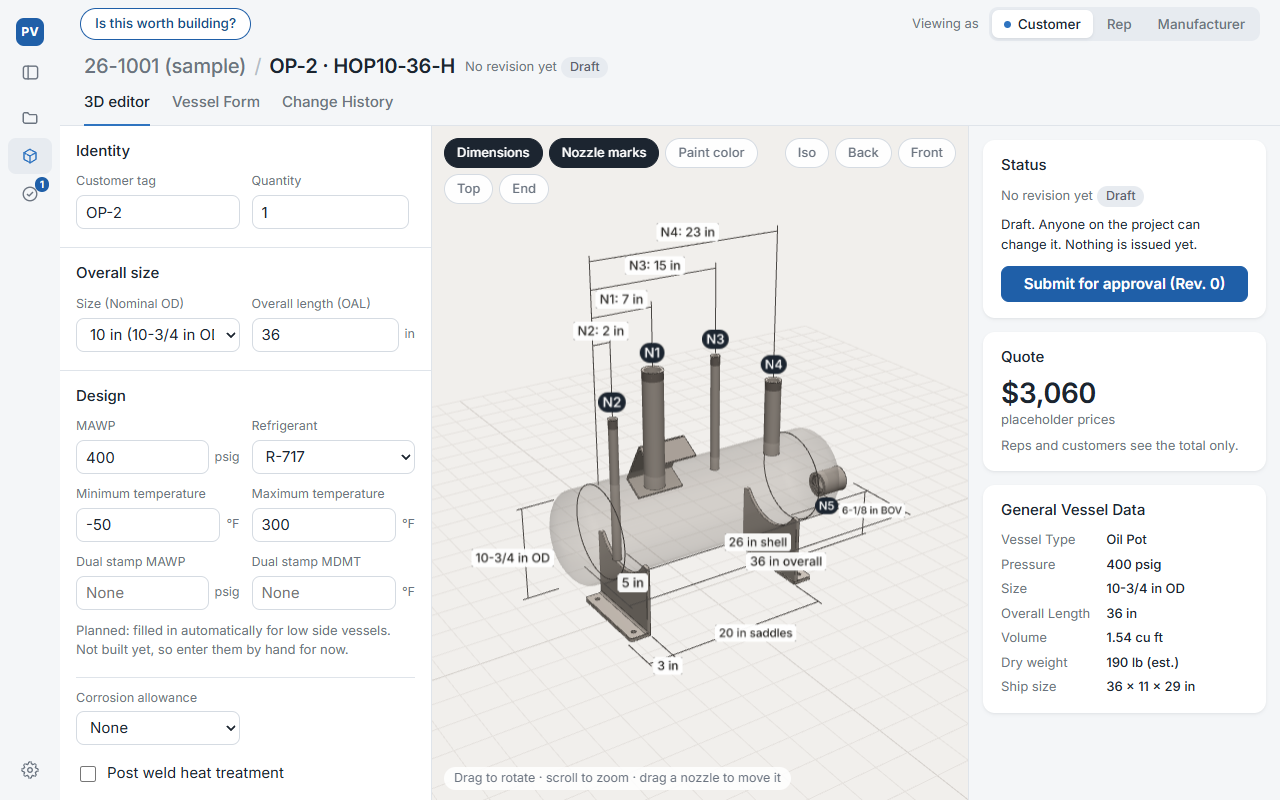
Edit the 3D vessel in a browser. Your rep and the manufacturer see the same version, and you can see where your change stands.
No sign-up and nothing to install. Sample data only.
The problem
Changing a vessel after the order is placed is slower than it should be.
You tell the rep, the rep tells the manufacturer, questions come back the same way, and you wait for revised approval drawings.
Until those drawings arrive, your order isn't final.
How it works
Make the change where everyone can see it.
You change the vessel
Move a nozzle or change a size on the 3D vessel yourself. No email to the rep to pass along.
The manufacturer approves
Your change goes to the manufacturer, and you can see that it is waiting on them.
Everyone sees the same version
Once approved, the vessel and its documents show the change for you, your rep and the manufacturer.
You can see what changed in each revision.
One thing to try
Open a vessel that is already approved for fabrication. Drag a nozzle along it, then press Revise Certified to send the change to the manufacturer. Switch Viewing as to Manufacturer to see your change waiting for approval.
The prototype covers one vessel type so far: a horizontal oil pot.
I'm Taylor Adamek, a mechanical engineer who has spent the past few years drafting in pressure vessel manufacturing.
I'm not selling anything yet. Before I continue building this, I want to find out whether this solves a real problem. What I most want to learn from buyers: how long does a change usually take to come back to you as a revised drawing?